


Iron Stops Source Code MT5
Table of Contents
Introduction & Product Overview
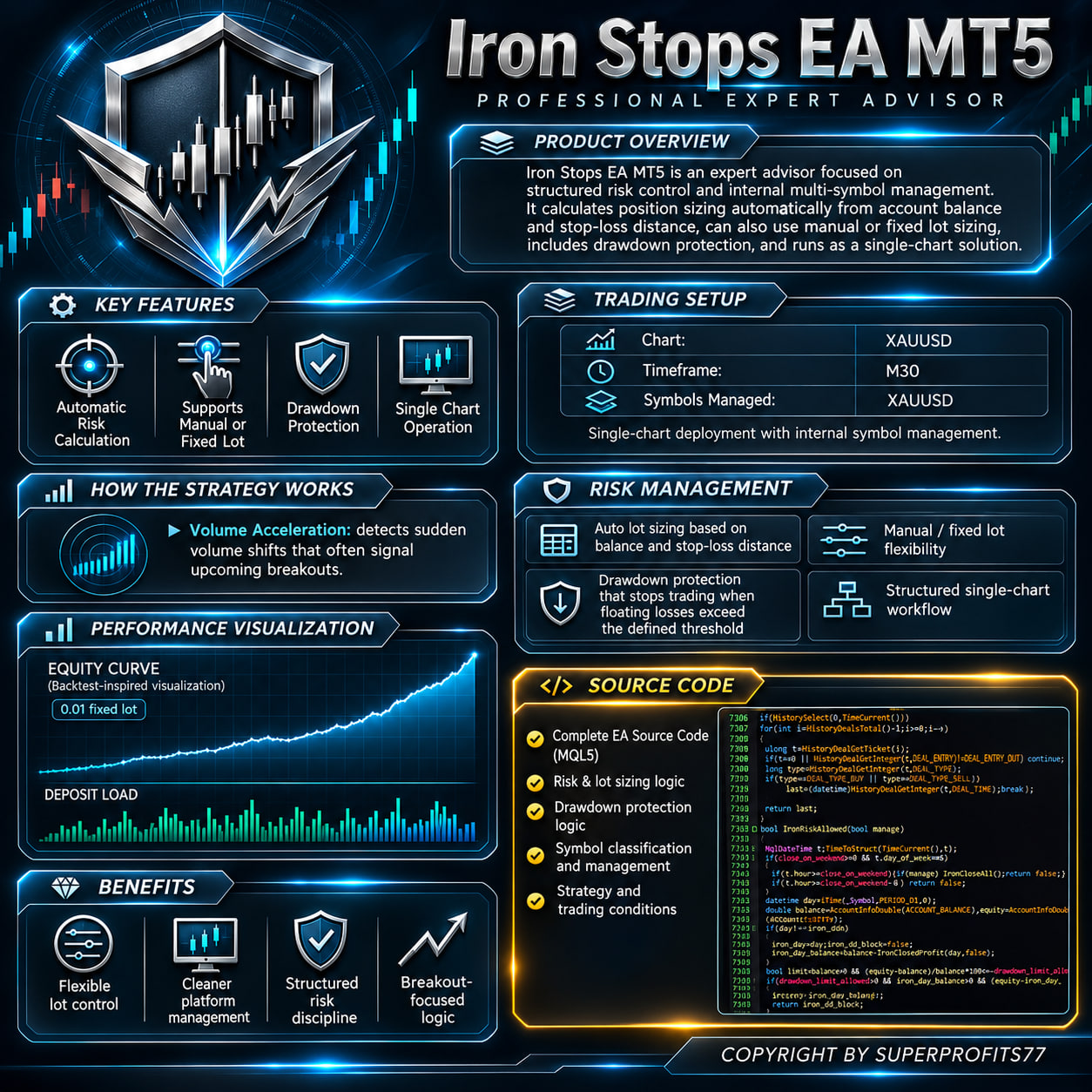
Iron Stops Source Code MT5 is offered as an Expert Advisor source-code bundle for MetaTrader 5, focused on automated trading, structured risk rules, and internal symbol handling. The promotional artwork specifies complete EA source code written in MQL5. It highlights trading logic, risk and lot sizing, drawdown safeguards, and symbol control as core parts of the programming.
The related product graphic outlines a setup meant to run on a single chart. Its sample layout utilizes XAUUSD on the M30 timeframe, with XAUUSD also designated as the managed symbol. Rather than needing a unique chart for every instrument, the architecture manages its symbol operations internally. Thus, the displayed layout is precise: XAUUSD is the documented asset and M30 is the documented timeframe.
The strategy description in the visual highlights Volume Acceleration. This is explained as identifying sudden surges in trading volume that might indicate an impending breakout. This outlines the intended concept; it does not serve as an assurance that every volume spike will result in a profitable trade or successful breakout. Market structure, volatility, liquidity, spreads, and execution factors can all influence trading results.
As a source-code item, the focus extends beyond simply running a compiled robot. The visual materials directly showcase the MQL5 source code and core logic within the package. Buyers should inspect the provided files to ensure the editable source file exists before compiling or altering it. The graphic lists the programming language as MQL5, but does not state a exact filename, build number, or preset name.
Product Specifications
| Product | Iron Stops EA source code |
| Platform | MetaTrader 5 |
| Programming language | MQL5 |
| Chart symbol | XAUUSD |
| Timeframe | M30 |
| Managed symbol shown | XAUUSD |
| Operation | Single-chart deployment |
| Strategy concept | Volume acceleration and breakout detection |
| Source format shown | MQL5 source code |
Key Features
Automatic Risk Calculation
The documentation outlines dynamic position sizing based on account balance and stop-loss distance. This links the calculated trade volume to account equity and stop distance. The actual monetary exposure still relies on active risk settings, contract specifications, tick value, and broker execution quality. Users should examine these inputs and the calculation code before deploying the system on a live account.
Manual or Fixed Lot Flexibility
The graphic indicates that the EA permits manual or fixed-lot sizing alongside automatic risk calculation. This allows users to choose between letting the program determine lot size or setting a fixed volume. Fixed lots do not dynamically scale as account equity fluctuates, so traders should be aware of this behavior prior to selecting a volume.
Drawdown Protection
Drawdown safeguards are featured as a core risk-management feature. Per the promotional image, trading can halt when floating losses breach a specified limit. This serves to establish a configurable boundary for adverse equity movement. It should not be interpreted as an absolute safeguard against losses, as gaps, slippage, delays, and rapid price shifts can cause real results to deviate from the limit.
Single-Chart Operation
The stated workflow utilizes one chart while the EA handles symbol management internally. The supplied configuration table explicitly names XAUUSD as both the chart asset and managed asset. Broader mentions in the graphic point to internal symbol handling, but omit any confirmed list of extra instruments. Therefore, XAUUSD remains the sole specified asset.
Additional Capabilities
The source-code panel in the infographic lists several functional areas that are represented in the package. These include complete EA source code in MQL5, risk and lot-sizing logic, drawdown protection logic, symbol classification and management, and the strategy and trading conditions. Together, these components describe the main areas a developer or technically capable trader may inspect when reviewing the program.
Access to source code can be useful when reviewing how inputs are processed, how position size is calculated, how drawdown limits are checked, and how the EA handles its configured symbol. It can also provide a basis for controlled customization, provided the buyer has sufficient MQL5 knowledge and understands the consequences of changing trading logic. Editing a risk function or entry condition without proper testing may materially change the EA’s behavior.
The product artwork also includes an equity-curve illustration labelled as a backtest-inspired visualization and marked with a 0.01 fixed lot. It is a visual representation, not a complete audited performance report. No precise return, drawdown, profit factor, or independently verified historical performance figure is established by that illustration. It should not be used as a forecast of future results.
The associated MQL5 signal page is a separate live-account snapshot, not a substitute for the source-code specification. At the time checked, it showed 20 trades, 16 profitable trades, four losing trades, a 1.79 profit factor, and a 46.83% relative equity drawdown. The signal page itself displayed warnings about the small number of deals, the short account history, and the possibility of high risk. Those figures describe that signal account at that point in time; they are not guaranteed results and should not be combined with the illustrative equity curve in the product image.
Pros & Cons
| ✅ PROS | ❌ CONS |
|---|---|
| MQL5 source code is explicitly shown in the product artwork. | The supplied materials do not identify a specific source filename or version. |
| Automatic risk calculation and manual or fixed-lot modes are described. | Source-code modification requires MQL5 knowledge and careful testing. |
| Drawdown protection and single-chart operation are highlighted. | The documented setup is limited to XAUUSD on M30. |
| The infographic explains the volume-acceleration strategy concept. | The signal history is short and carries high-risk warnings. |
Conclusion
Iron Stops Source Code MT5 is delivered as an MQL5 Expert Advisor source code package featuring automated risk calculations, adjustable lot sizing, drawdown controls, and single-chart execution. Its pictured trading setup uses XAUUSD on M30, while its strategy relies on volume acceleration to detect potential breakout signals.
The bundle can benefit users seeking to examine an EA’s inner workings or edit source code instead of relying on a locked compiled file. Key elements to inspect include the delivered source files, risk algorithms, drawdown behaviors, symbol management, and entry/exit rules. Analyze these sections thoroughly prior to modifying code or launching the EA on live markets.
Risk Warning & Demo Testing Recommendations
Before installation, confirm that the files match MetaTrader 5 and that the MQL5 source file exists if editable code was purchased. Place documents in proper MetaTrader 5 folders, compile within MetaEditor, and fix any compilation issues before attaching the EA to charts. Maintain a pristine backup of the original source prior to making edits.
Configure the EA carefully. Begin by checking automatic risk rules, stop-loss distances, lot modes, and drawdown limits. Verify the chart asset and timeframe against the documented setup: XAUUSD and M30. Do not assume extra assets or timeframes work simply because internal symbol management is referenced. Any adjustments to symbol rules, sizing, or conditions should be treated as code modifications requiring fresh testing.
Utilize the MetaTrader 5 Strategy Tester to evaluate the EA using relevant historical data and realistic market conditions. Test diverse scenarios, including trending, sideways, and volatile phases. Track trade frequency, loss streaks, drawdowns, sizing, and protection behavior. If you alter the source code, re-run tests and compare outputs against the baseline to catch unintended flaws.
Following backtests, perform forward tests on a demo account. Demo runs assist in checking real-time dynamics, though they may not perfectly mimic live execution. Variances stem from spreads, commissions, swaps, slippage, liquidity, rejections, latency, server states, and execution quality. Gold markets often see fast price changes, meaning execution prices can deviate from historical test prices.
Apply conservative risk settings during initial testing. A drawdown threshold is a safety control, not a guarantee that losses will halt precisely at that mark in all conditions. Keep an eye on your account and EA rather than assuming automation removes the need for oversight. Only proceed to live accounts after fully comprehending the source code, testing parameters, and confirming you can sustain potential losses.


Reviews
There are no reviews yet.